
6 posts tagged with "workflow"

View All Tags

· 8 min read
Richard

The Model Context Protocol (MCP) is rapidly becoming the standard way for AI assistants like Claude, ChatGPT, and GitHub Copilot to interact with external tools and services. With Laravel MCP, you can expose your Laravel Workflow processes as callable tools that any MCP-compatible AI client can discover, invoke, and monitor.

In this post, we'll show how to build an MCP server that allows AI clients to:

  • Discover available workflows
  • Start workflows asynchronously
  • Poll for status and retrieve results

This creates a powerful pattern where AI agents can orchestrate long-running, durable workflows, perfect for complex tasks that can't complete in a single request.

Why MCP + Laravel Workflow?

Laravel Workflow excels at durable, stateful execution. MCP excels at giving AI clients structured access to external capabilities. Together, they enable:

  • Async AI operations: Start a workflow, continue the conversation, check results later
  • Reliable execution: Workflows survive crashes, retries, and long wait times
  • Observability: Track every workflow through Waterline's dashboard
  • Stateless servers: The MCP server doesn't hold state. Clients track workflow IDs

This mirrors how humans delegate tasks: "Start this report, I'll check back later."

What We're Building

We'll create an MCP server with three tools:

ToolPurpose
list_workflowsDiscover available workflows and view recent runs
start_workflowStart a workflow and get a tracking ID
get_workflow_resultCheck status and retrieve output when complete

Step-by-Step Implementation

1. Install Laravel MCP

composer require laravel/mcp
php artisan vendor:publish --tag=ai-routes

This gives you routes/ai.php where you'll register your MCP server.

2. Create the MCP Server

php artisan make:mcp-server WorkflowServer

Configure it with instructions for the AI:

namespace App\Mcp\Servers;

use App\Mcp\Tools\GetWorkflowResultTool;
use App\Mcp\Tools\ListWorkflowsTool;
use App\Mcp\Tools\StartWorkflowTool;
use Laravel\Mcp\Server;

class WorkflowServer extends Server
{
protected string $name = 'Laravel Workflow Server';
protected string $version = '1.0.0';

protected string $instructions = <<<'MARKDOWN'
This server allows you to start and monitor Laravel Workflows.

## Typical Usage Pattern

1. Call `list_workflows` to see what workflows are available.
2. Call `start_workflow` with the workflow name and arguments.
3. Store the returned `workflow_id`.
4. Call `get_workflow_result` until status is `WorkflowCompletedStatus`.
5. Read the `output` field for the result.

## Status Values

- `WorkflowCreatedStatus` - Workflow has been created
- `WorkflowPendingStatus` - Queued for execution
- `WorkflowRunningStatus` - Currently executing
- `WorkflowWaitingStatus` - Waiting (timer, signal, etc.)
- `WorkflowCompletedStatus` - Finished successfully
- `WorkflowFailedStatus` - Encountered an error
MARKDOWN;

protected array $tools = [
ListWorkflowsTool::class,
StartWorkflowTool::class,
GetWorkflowResultTool::class,
];
}

3. Create the Start Workflow Tool

php artisan make:mcp-tool StartWorkflowTool
namespace App\Mcp\Tools;

use Illuminate\Contracts\JsonSchema\JsonSchema;
use Illuminate\Support\Arr;
use Laravel\Mcp\Request;
use Laravel\Mcp\Response;
use Laravel\Mcp\Server\Tool;
use Workflow\Workflow;
use Workflow\WorkflowStub;

class StartWorkflowTool extends Tool
{
protected string $description = <<<'MARKDOWN'
Start a Laravel Workflow asynchronously and return its workflow ID.

The workflow will execute in the background on the queue. Use the
`get_workflow_result` tool to poll for status and retrieve results
once the workflow completes.
MARKDOWN;

public function handle(Request $request): Response
{
$data = $request->validate([
'workflow' => ['required', 'string'],
'args' => ['nullable', 'array'],
'external_id' => ['nullable', 'string', 'max:255'],
]);

$workflowKey = $data['workflow'];
$args = Arr::get($data, 'args', []);
$externalId = $data['external_id'] ?? null;

$workflowClass = $this->resolveWorkflowClass($workflowKey);

if ($workflowClass === null) {
return Response::error("Unknown workflow: {$workflowKey}");
}

if (! class_exists($workflowClass) || ! is_subclass_of($workflowClass, Workflow::class)) {
return Response::error("Invalid workflow class: {$workflowClass}");
}

$stub = WorkflowStub::make($workflowClass);
$stub->start(...array_values($args));

$status = $stub->status();
$statusName = is_object($status) ? class_basename($status) : class_basename((string) $status);

return Response::json([
'workflow_id' => $stub->id(),
'workflow' => $workflowKey,
'status' => $statusName,
'external_id' => $externalId,
'message' => 'Workflow started. Use get_workflow_result to poll status.',
]);
}

protected function resolveWorkflowClass(string $key): ?string
{
$mapped = config("workflow_mcp.workflows.{$key}");
if ($mapped !== null) {
return $mapped;
}

if (config('workflow_mcp.allow_fqcn', false) && str_contains($key, '\\')) {
return $key;
}

return null;
}

public function schema(JsonSchema $schema): array
{
$workflows = implode(', ', array_keys(config('workflow_mcp.workflows', [])));

return [
'workflow' => $schema->string()
->description("The workflow to start. Available: {$workflows}"),
'args' => $schema->object()
->description('Arguments for the workflow execute() method.'),
'external_id' => $schema->string()
->description('Optional idempotency key for tracking.'),
];
}
}

4. Create the Get Result Tool

php artisan make:mcp-tool GetWorkflowResultTool
namespace App\Mcp\Tools;

use App\Models\StoredWorkflow;
use Illuminate\Contracts\JsonSchema\JsonSchema;
use Laravel\Mcp\Request;
use Laravel\Mcp\Response;
use Laravel\Mcp\Server\Tool;
use Workflow\States\WorkflowCompletedStatus;
use Workflow\States\WorkflowFailedStatus;
use Workflow\WorkflowStub;

class GetWorkflowResultTool extends Tool
{
protected string $description = <<<'MARKDOWN'
Fetch the status and, if completed, the output of a Laravel Workflow.

Use the workflow_id returned by `start_workflow` to check progress.
Once status is `WorkflowCompletedStatus`, the output field contains the result.
MARKDOWN;

public function handle(Request $request): Response
{
$data = $request->validate([
'workflow_id' => ['required'],
]);

$workflowId = $data['workflow_id'];
$stored = StoredWorkflow::find($workflowId);

if (! $stored) {
return Response::json([
'found' => false,
'message' => "Workflow {$workflowId} not found.",
]);
}

$workflow = WorkflowStub::load($workflowId);
$status = $workflow->status();
$statusName = is_object($status) ? class_basename($status) : class_basename((string) $status);
$running = $workflow->running();

$result = null;
$error = null;

if (! $running && str_contains($statusName, 'Completed')) {
$result = $workflow->output();
}

if (! $running && str_contains($statusName, 'Failed')) {
$exception = $stored->exceptions()->latest()->first();
$error = $exception?->exception ?? 'Unknown error';
}

return Response::json([
'found' => true,
'workflow_id' => $workflowId,
'status' => $statusName,
'running' => $running,
'output' => $result,
'error' => $error,
'created_at' => $stored->created_at?->toIso8601String(),
'updated_at' => $stored->updated_at?->toIso8601String(),
]);
}

public function schema(JsonSchema $schema): array
{
return [
'workflow_id' => $schema->string()
->description('The workflow ID returned by start_workflow.'),
];
}
}

5. Create the List Workflows Tool

php artisan make:mcp-tool ListWorkflowsTool
namespace App\Mcp\Tools;

use App\Models\StoredWorkflow;
use Illuminate\Contracts\JsonSchema\JsonSchema;
use Laravel\Mcp\Request;
use Laravel\Mcp\Response;
use Laravel\Mcp\Server\Tool;

class ListWorkflowsTool extends Tool
{
protected string $description = <<<'MARKDOWN'
List available workflow types and optionally show recent workflow runs.

Use this to discover what workflows can be started, or to see
the status of recent executions.
MARKDOWN;

public function handle(Request $request): Response
{
$data = $request->validate([
'show_recent' => ['nullable', 'boolean'],
'limit' => ['nullable', 'integer', 'min:1', 'max:50'],
'status' => ['nullable', 'string'],
]);

$showRecent = $data['show_recent'] ?? false;
$limit = $data['limit'] ?? 10;
$statusFilter = $data['status'] ?? null;

$availableWorkflows = [];
foreach (config('workflow_mcp.workflows', []) as $key => $class) {
$availableWorkflows[] = ['key' => $key, 'class' => $class];
}

$response = [
'available_workflows' => $availableWorkflows,
];

if ($showRecent) {
$query = StoredWorkflow::query()
->orderBy('created_at', 'desc')
->limit($limit);

if ($statusFilter) {
$query->where('status', 'like', "%{$statusFilter}%");
}

$response['recent_workflows'] = $query->get()->map(function ($w) {
$status = $w->status;
$statusName = is_object($status) ? class_basename($status) : class_basename((string) $status);

return [
'id' => $w->id,
'class' => $w->class,
'status' => $statusName,
'created_at' => $w->created_at?->toIso8601String(),
];
});
}

return Response::json($response);
}

public function schema(JsonSchema $schema): array
{
return [
'show_recent' => $schema->boolean()
->description('Include recent workflow runs in response.'),
'limit' => $schema->integer()
->description('Max recent workflows to return (default: 10).'),
'status' => $schema->string()
->description('Filter by status (e.g., "Completed", "Failed").'),
];
}
}

6. Configure Available Workflows

Create config/workflow_mcp.php to whitelist which workflows AI clients can start:

return [
'allow_fqcn' => env('WORKFLOW_MCP_ALLOW_FQCN', false),

'workflows' => [
'simple' => App\Workflows\Simple\SimpleWorkflow::class,
'prism' => App\Workflows\Prism\PrismWorkflow::class,
],
];

This prevents arbitrary class execution. Only mapped workflows are accessible.

7. Register the MCP Server

Update routes/ai.php:

use App\Mcp\Servers\WorkflowServer;
use Laravel\Mcp\Facades\Mcp;

Mcp::web('/mcp/workflows', WorkflowServer::class);

Connecting AI Clients

VS Code / GitHub Copilot

Create .vscode/mcp.json in your project:

{
"servers": {
"laravel-workflow": {
"type": "http",
"url": "http://localhost/mcp/workflows"
}
}
}

This configuration works for both local development and GitHub Codespaces. In Codespaces, the VS Code server runs inside the container, so localhost correctly reaches the Laravel server without needing public ports or the *.app.github.dev URL.

After reloading VS Code (Cmd/Ctrl+Shift+P → "Developer: Reload Window"), Copilot can use the workflow tools directly in chat.

Real-World Usage

Once connected, you can have natural conversations with your AI assistant:

You: "What workflows are available?"

AI: calls list_workflows "I found 2 workflows: simple and prism."

You: "Start the prism workflow"

AI: calls start_workflow "Started workflow ID 42. I'll check its status."

AI: calls get_workflow_result "The workflow completed! Here's the generated user profile: { name: 'Elena', hobbies: [...] }"

This creates a seamless experience where AI assistants can orchestrate complex, long-running operations while keeping the user informed.

What Makes This Pattern Powerful

  • Durability: Workflows survive server restarts and network failures
  • Async by design: AI clients don't block waiting for completion
  • Observable: Every workflow is tracked in Waterline's dashboard
  • Secure: Whitelist-based workflow access prevents arbitrary execution
  • Stateless MCP: The server holds no state. Clients track workflow IDs

Try It Now in Your Browser

This MCP integration is included and pre-configured in the Laravel Workflow Sample App.

To try it:

  1. Open the sample-app repo on GitHub
  2. Click CodeCodespacesCreate codespace on main
  3. Wait for the environment to build
  4. Setup the app and start the queue worker:
    php artisan app:init
    php artisan queue:work
  5. Ask your AI to list and run workflows!

Where to Go From Here

You can extend this pattern to:

  • Parameterized workflows: Pass user input to workflow arguments
  • Webhook notifications: Push completion events instead of polling
  • Workflow signals: Let AI clients send signals to waiting workflows
  • Progress streaming: Use SSE to stream workflow progress in real-time
  • Multi-step agents: Chain multiple workflows together in a conversation

The combination of Laravel Workflow's durable execution and MCP's tool protocol creates a foundation for truly capable AI agents that can handle real-world complexity.

· 4 min read
Richard

captionless image

Laravel Workflow is a powerful tool for orchestrating long-running, stateful workflows in PHP. Paired with PrismPHP, it becomes a compelling foundation for building reliable AI agents that not only generate structured data but verify and retry until results meet strict real-world constraints.

In this post, we’ll show how to use Laravel Workflow + Prism to create an agentic loop that:

  • Generates structured data using an LLM
  • Validates the result against custom rules
  • Retries automatically until the result passes

You can try this exact workflow right now in your browser with no setup or coding required. Just click the button in the Laravel Workflow Sample App and launch a GitHub Codespace to run it.

What We’re Building

We’ll create a workflow that asks an LLM to generate a user profile with hobbies. Then we’ll validate that:

  • The name is present
  • At least one hobby is defined
  • The name starts with a vowel

If the result fails validation, we loop back to the LLM and regenerate. All of this is durable, asynchronous, and tracked through stateful events.

Step-by-Step Example

  1. Console Command to Trigger the Workflow
use App\Workflows\Prism\PrismWorkflow;
use Illuminate\Console\Command;
use Workflow\WorkflowStub;

class Prism extends Command
{
protected $signature = 'app:prism';

protected $description = 'Runs a Prism AI workflow';

public function handle()
{
$workflow = WorkflowStub::make(PrismWorkflow::class);
$workflow->start();
while ($workflow->running());
$user = $workflow->output();

$this->info('Generated User:');
$this->info(json_encode($user, JSON_PRETTY_PRINT));
}
}
  1. Define the Workflow Logic
use Workflow\ActivityStub;
use Workflow\Workflow;

class PrismWorkflow extends Workflow
{
public function execute()
{
do {
$user = yield ActivityStub::make(GenerateUserActivity::class);
$valid = yield ActivityStub::make(ValidateUserActivity::class, $user);
} while (!$valid);

return $user;
}
}

This is a classic agent loop. If validation fails, we prompt again automatically.

  1. Generate Structured User Data with PrismPHP
use Prism\Prism\Prism;
use Prism\Prism\Enums\Provider;
use Prism\Prism\Schema\ArraySchema;
use Prism\Prism\Schema\ObjectSchema;
use Prism\Prism\Schema\StringSchema;
use Workflow\Activity;

class GenerateUserActivity extends Activity
{
public function execute()
{
$schema = new ObjectSchema(
name: 'user',
description: 'A user profile with their hobbies',
properties: [
new StringSchema('name', 'The user\'s full name'),
new ArraySchema(
name: 'hobbies',
description: 'The user\'s list of hobbies',
items: new ObjectSchema(
name: 'hobby',
description: 'A detailed hobby entry',
properties: [
new StringSchema('name', 'The name of the hobby'),
new StringSchema('description', 'A brief description of the hobby'),
],
requiredFields: ['name', 'description']
)
),
],
requiredFields: ['name', 'hobbies']
);

$response = Prism::structured()
->using(Provider::OpenAI, 'gpt-4o')
->withSchema($schema)
->withPrompt('Use names from many languages and vary first initials.')
->asStructured();

return $response->structured;
}
}
  1. Validate Business Logic
use Workflow\Activity;

class ValidateUserActivity extends Activity
{
public function execute($user)
{
if (empty($user['name']) || !is_array($user['hobbies']) || count($user['hobbies']) === 0) {
return false;
}

foreach ($user['hobbies'] as $hobby) {
if (empty($hobby['name']) || empty($hobby['description'])) {
return false;
}
}

// Extra Validation: The user's name must start with a vowel.
if (!in_array(strtoupper($user['name'][0]), ['A', 'E', 'I', 'O', 'U'])) {
return false;
}

return true;
}
}

What Makes This Pattern Powerful

This design pattern is what you’d call a reliable agentic loop:

  • LLM generation via Prism
  • Validation & retry via Laravel Workflow
  • State persistence for crash recovery or inspection
  • Observability via Waterline

It’s perfect for AI applications where accuracy, safety, and traceability are required.

Try It Now in Your Browser

We’ve bundled this workflow into the official Laravel Workflow Sample App, which runs in GitHub Codespaces.

To launch it:

  1. Open the sample-app repo
  2. Click the “Code” button → “Codespaces” → “Create codespace on main”
  3. Wait a few seconds for setup
  4. Set your OPENAI_API_KEY
  5. Run:
php artisan migrate
php artisan queue:work
  1. In a second terminal:
php artisan app:prism

You will see the queue working and eventually see the validated output.

Where to Go From Here

You can easily adapt this pattern to:

  • AI agents for form filling
  • Data scraping and validation
  • Content generation with retry policies
  • Moderation and review queues

Each step remains reliable and traceable thanks to Laravel Workflow’s durable execution model.

· 4 min read
Richard

captionless image

Have you ever spent hours tracking down a frontend bug that only happens in production? When working with web applications, debugging frontend issues can be challenging. Console errors and unexpected UI behaviors often require careful inspection and reproducible test cases. Wouldn’t it be great if you could automate this process, capture errors, and even record a video of the session for later analysis?

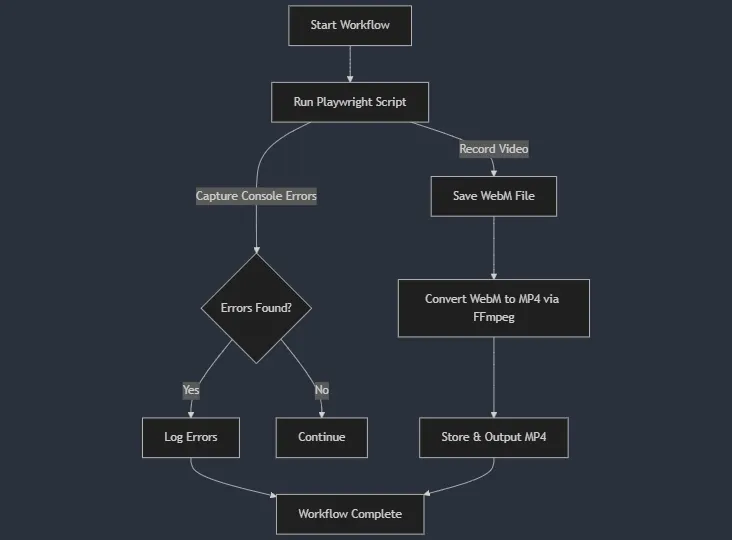
With Playwright and Laravel Workflow, you can achieve just that! In this post, I’ll walk you through an automated workflow that:

  • Loads a webpage and captures console errors.
  • Records a video of the session.
  • Converts the video to an MP4 format for easy sharing.
  • Runs seamlessly in a GitHub Codespace.

The Stack

  • Playwright: A powerful browser automation tool for testing web applications.
  • Laravel Workflow: A durable workflow engine for handling long-running, distributed processes.
  • FFmpeg: Used to convert Playwright’s WebM recordings to MP4 format.
captionless image

1. Capturing Errors and Video with Playwright

The Playwright script automates a browser session, navigates to a given URL, and logs any console errors. It also records a video of the entire session.

import { chromium } from 'playwright';
import path from 'path';
import fs from 'fs';

(async () => {
const url = process.argv[2];
const videoDir = path.resolve('./videos');

if (!fs.existsSync(videoDir)) {
fs.mkdirSync(videoDir, { recursive: true });
}

const browser = await chromium.launch({ args: ['--no-sandbox'] });
const context = await browser.newContext({
recordVideo: { dir: videoDir }
});

const page = await context.newPage();

let errors = [];

page.on('console', msg => {
if (msg.type() === 'error') {
errors.push(msg.text());
}
});

try {
await page.goto(url, { waitUntil: 'networkidle', timeout: 10000 });
} catch (error) {
errors.push(`Page load error: ${error.message}`);
}
const video = await page.video().path();

await browser.close();

console.log(JSON.stringify({ errors, video }));
})();

2. Running the Workflow

A Laravel console command (php artisan app:playwright) starts the workflow which:

  • Runs the Playwright script and collects errors.
  • Converts the video from .webm to .mp4 using FFmpeg.
  • Returns the errors and the final video file path.
namespace App\Console\Commands;

use App\Workflows\Playwright\CheckConsoleErrorsWorkflow;
use Illuminate\Console\Command;
use Workflow\WorkflowStub;

class Playwright extends Command
{
protected $signature = 'app:playwright';

protected $description = 'Runs a playwright workflow';

public function handle()
{
$workflow = WorkflowStub::make(CheckConsoleErrorsWorkflow::class);
$workflow->start('https://example.com');
while ($workflow->running());
$this->info($workflow->output()['mp4']);
}
}

3. The Workflow

namespace App\Workflows\Playwright;

use Workflow\ActivityStub;
use Workflow\Workflow;

class CheckConsoleErrorsWorkflow extends Workflow
{
public function execute(string $url)
{
$result = yield ActivityStub::make(CheckConsoleErrorsActivity::class, $url);

$mp4 = yield ActivityStub::make(ConvertVideoActivity::class, $result['video']);

return [
'errors' => $result['errors'],
'mp4' => $mp4,
];
}
}

4. Running Playwright

namespace App\Workflows\Playwright;

use Illuminate\Support\Facades\Process;
use Workflow\Activity;

class CheckConsoleErrorsActivity extends Activity
{
public function execute(string $url)
{
$result = Process::run([
'node', base_path('playwright-script.js'), $url
])->throw();

return json_decode($result->output(), true);
}
}

5. Video Conversion with FFmpeg

The Playwright recording is stored in WebM format, but we need an MP4 for wider compatibility. Laravel Workflow runs this process asynchronously.

namespace App\Workflows\Playwright;

use Illuminate\Support\Facades\Process;
use Workflow\Activity;

class ConvertVideoActivity extends Activity
{
public function execute(string $webm)
{
$mp4 = str_replace('.webm', '.mp4', $webm);

Process::run([
'ffmpeg', '-i', $webm, '-c:v', 'libx264', '-preset', 'fast', '-crf', '23', '-c:a', 'aac', '-b:a', '128k', $mp4
])->throw();

unlink($webm);

return $mp4;
}
}

🚀 Try It Out in a GitHub Codespace

You don’t need to set up anything on your local machine. Everything is already configured in the Laravel Workflow Sample App.

Steps to Run the Playwright Workflow

  • Open the Laravel Workflow Sample App on GitHub: laravel-workflow/sample-app
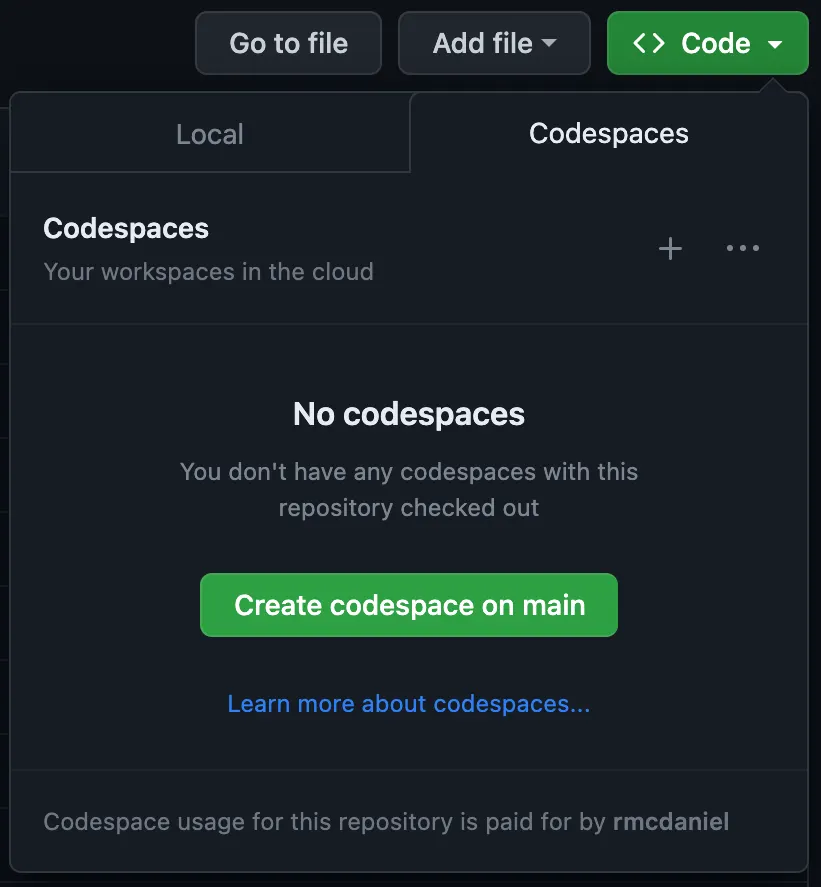
  • Click “Create codespace on main” to start a pre-configured development environment.
captionless image

  • Once the Codespace is ready, run the following commands in the terminal:
php artisan migrate
php artisan queue:work
  • Then open a second terminal and run this command:
php artisan app:playwright

That’s it! The workflow will execute, capture console errors, record a video, and convert it to MP4. You can find the video in the videos folder. Take a look at the sample app’s README.md for more information on other workflows and how to view the Waterline UI.

Conclusion

By integrating Playwright with Laravel Workflow, we’ve automated frontend error detection and debugging. This setup allows teams to quickly identify and resolve issues, all while leveraging Laravel’s queue system to run tasks asynchronously.

🔗 Next Steps

Happy automating! 🚀

· 2 min read
Richard

captionless image

One of the strengths of the Laravel ecosystem is its flexibility, thanks to a myriad of community-driven packages that enhance the framework’s capabilities. The laravel-workflow and spatie/laravel-tags packages are two such examples, and in this post, we'll integrate them together to make workflows taggable.

Installation Instructions

Before diving into the code, let’s ensure both libraries are properly installed:

  1. Install Laravel Workflow and Spatie Laravel Tags.
composer require laravel-workflow/laravel-workflow spatie/laravel-tags
  1. Both packages include migrations that must be published.
php artisan vendor:publish --provider="Workflow\Providers\WorkflowServiceProvider" --tag="migrations"
php artisan vendor:publish --provider="Spatie\Tags\TagsServiceProvider" --tag="tags-migrations"
  1. Run the migrations.
php artisan migrate

Publishing Configuration

To extend Laravel Workflow, publish its configuration file:

php artisan vendor:publish --provider="Workflow\Providers\WorkflowServiceProvider" --tag="config"

Extending Workflows to Support Tags

We need to extend the StoredWorkflow model of laravel-workflow to support tagging.

namespace App\Models;

use Spatie\Tags\HasTags;
use Workflow\Models\StoredWorkflow as BaseStoredWorkflow;
use Workflow\WorkflowStub;

class StoredWorkflow extends BaseStoredWorkflow
{
use HasTags;

public static function tag(WorkflowStub $workflow, $tag): void
{
$storedWorkflow = static::find($workflow->id());
if ($storedWorkflow) {
$storedWorkflow->attachTag($tag);
}
}

public static function findByTag($tag): ?WorkflowStub
{
$storedWorkflow = static::withAnyTags([$tag])->first();
if ($storedWorkflow) {
return WorkflowStub::fromStoredWorkflow($storedWorkflow);
}
}
}

Modify the Configuration

In config/workflow.php, update this line:

'stored_workflow_model' => Workflow\Models\StoredWorkflow::class,

To:

'stored_workflow_model' => App\Models\StoredWorkflow::class,

This ensures Laravel Workflow uses the extended model.

Running Tagged Workflows

With the taggable StoredWorkflow ready, create a console command to create, tag, retrieve, and run a workflow.

namespace App\Console\Commands;

use App\Models\StoredWorkflow;
use App\Workflows\Simple\SimpleWorkflow;
use Illuminate\Console\Command;
use Workflow\WorkflowStub;

class Workflow extends Command
{
protected $signature = 'workflow';

protected $description = 'Runs a workflow';

public function handle()
{
// Create a workflow and tag it
$workflow = WorkflowStub::make(SimpleWorkflow::class);
StoredWorkflow::tag($workflow, 'tag1');

// Find the workflow by tag and start it
$workflow = StoredWorkflow::findByTag('tag1');
$workflow->start();

while ($workflow->running());

$this->info($workflow->output());
}
}

Conclusion

By integrating laravel-workflow with spatie/laravel-tags, we've enabled tagging for workflows, making management more intuitive in larger applications. Thanks to Laravel’s extensible nature, endless possibilities await developers leveraging these powerful packages.

· 3 min read
Richard

captionless image

Introduction

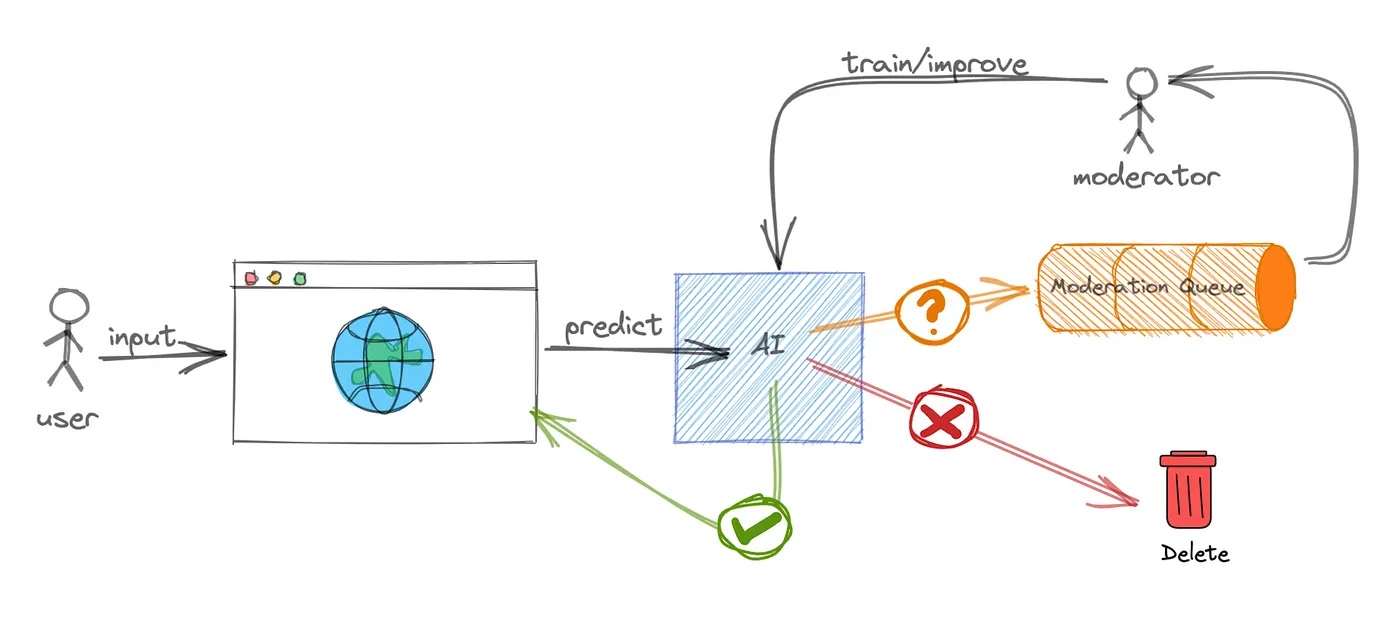
Before we begin, let’s understand the scenario. We are building an image moderation system where:

  1. Every image undergoes an initial AI check to determine if it’s safe.
  2. If the AI deems the image unsafe, it’s automatically logged and deleted.
  3. If it’s potentially safe, a human moderator is alerted to further review the image. They have the option to approve or reject the image.
  4. Approved images are moved to a public location, whereas rejected images are deleted.

Laravel Workflow

Laravel Workflow is designed to streamline and organize complex processes in applications. It allows developers to define, manage, and execute workflows seamlessly. You can find installation instructions here.

ClarifAI API

ClarifAI provides AI-powered moderation tools for analyzing visual content. They offer a free plan with up to 1,000 actions per month.

1. Store your credentials in .env.

CLARIFAI_API_KEY=key
CLARIFAI_APP=my-application
CLARIFAI_WORKFLOW=my-workflow
CLARIFAI_USER=username

2. Add the service to config/services.php.

'clarifai' => [
'api_key' => env('CLARIFAI_API_KEY'),
'app' => env('CLARIFAI_APP'),
'workflow' => env('CLARIFAI_WORKFLOW'),
'user' => env('CLARIFAI_USER'),
],

3. Create a service at app/Services/ClarifAI.php.

namespace App\Services;

use Illuminate\Support\Facades\Http;

class ClarifAI
{
private $apiKey;
private $apiUrl;

public function __construct()
{
$app = config('services.clarifai.app');
$workflow = config('services.clarifai.workflow');
$user = config('services.clarifai.user');
$this->apiKey = config('services.clarifai.api_key');
$this->apiUrl = "https://api.clarifai.com/v2/users/{$user}/apps/{$app}/workflows/{$workflow}/results/";
}

public function checkImage(string $image): bool
{
$response = Http::withToken($this->apiKey, 'Key')
->post($this->apiUrl, ['inputs' => [
['data' => ['image' => ['base64' => base64_encode($image)]]],
]]);

return collect($response->json('results.0.outputs.0.data.concepts', []))
->filter(fn ($value) => $value['name'] === 'safe')
->map(fn ($value) => round((float) $value['value']) > 0)
->first() ?? false;
}
}

Creating the Workflow

namespace App\Workflows;

use Workflow\ActivityStub;
use Workflow\SignalMethod;
use Workflow\WorkflowStub;
use Workflow\Workflow;

class ImageModerationWorkflow extends Workflow
{
private bool $approved = false;
private bool $rejected = false;

#[SignalMethod]
public function approve()
{
$this->approved = true;
}

#[SignalMethod]
public function reject()
{
$this->rejected = true;
}

public function execute($imagePath)
{
$safe = yield from $this->check($imagePath);

if (! $safe) {
yield from $this->unsafe($imagePath);
return 'unsafe';
}

yield from $this->moderate($imagePath);

return $this->approved ? 'approved' : 'rejected';
}

private function check($imagePath)
{
return yield ActivityStub::make(AutomatedImageCheckActivity::class, $imagePath);
}

private function unsafe($imagePath)
{
yield ActivityStub::all([
ActivityStub::make(LogUnsafeImageActivity::class, $imagePath),
ActivityStub::make(DeleteImageActivity::class, $imagePath),
]);
}

private function moderate($imagePath)
{
while (true) {
yield ActivityStub::make(NotifyImageModeratorActivity::class, $imagePath);

$signaled = yield WorkflowStub::awaitWithTimeout('24 hours', fn () => $this->approved || $this->rejected);

if ($signaled) break;
}
}
}

Activities

Automated Image Check

namespace App\Workflows;

use App\Services\ClarifAI;
use Illuminate\Support\Facades\Storage;
use Workflow\Activity;

class AutomatedImageCheckActivity extends Activity
{
public function execute($imagePath)
{
return app(ClarifAI::class)
->checkImage(Storage::get($imagePath));
}
}

Logging Unsafe Images

namespace App\Workflows;

use Illuminate\Support\Facades\Log;
use Workflow\Activity;

class LogUnsafeImageActivity extends Activity
{
public function execute($imagePath)
{
Log::info('Unsafe image detected at: ' . $imagePath);
}
}

Deleting Images

namespace App\Workflows;

use Illuminate\Support\Facades\Storage;
use Workflow\Activity;

class DeleteImageActivity extends Activity
{
public function execute($imagePath)
{
Storage::delete($imagePath);
}
}

Starting and Signaling the Workflow

$workflow = WorkflowStub::make(ImageModerationWorkflow::class);
$workflow->start('tmp/good.jpg');

For approvals or rejections:

$workflow = WorkflowStub::load($id);
$workflow->approve();
// or
$workflow->reject();

Conclusion

Laravel Workflow provides a structured approach to handle complex processes like image moderation. It supports asynchronous processing, external API integrations, and modular design for scalability. Thanks for reading!

· 4 min read
Richard

captionless image

In the evolving landscape of microservices, communication has always been a focal point. Microservices can interact in various ways, be it through HTTP/REST calls, using messaging protocols like RabbitMQ or Kafka, or even employing more recent technologies like gRPC. Yet, regardless of the communication method, the goal remains the same: seamless, efficient, and robust interactions. Today, we’ll explore how Laravel Workflow can fit into this picture and optimize the communication between microservices in a unique way.

The Challenge

In a microservices architecture, decoupling is the name of the game. You want each service to have a single responsibility, to be maintainable, and to be independently deployable. Yet, in the world of workflows, this becomes challenging. How do you split a workflow from its activity and yet ensure they communicate seamlessly?

Laravel Workflow to the Rescue!

Laravel Workflow handles the discovery and orchestration for you! With a shared database and queue connection, you can have your workflow in one Laravel app and its activity logic in another.

Defining Workflows and Activities

1. Create a workflow.

use Workflow\ActivityStub;
use Workflow\Workflow;

class MyWorkflow extends Workflow
{
public function execute($name)
{
$result = yield ActivityStub::make(MyActivity::class, $name);
return $result;
}
}

2. Create an activity.

use Workflow\Activity;

class MyActivity extends Activity
{
public function execute($name)
{
return "Hello, {$name}!";
}
}

3. Run the workflow.

use Workflow\WorkflowStub;

$workflow = WorkflowStub::make(MyWorkflow::class);
$workflow->start('world');
while ($workflow->running());
$workflow->output();
// Output: 'Hello, world!'

The workflow will manage the activity and handle any failures, retries, etc. Think of workflows like job chaining on steroids because you can have conditional logic, loops, return a result that can be used in the next activity, and write everything in typical PHP code that is failure tolerant.

Balancing Shared and Dedicated Resources

When working with microservices, it’s common for each service to have its dedicated resources, such as databases, caches, and queues. However, to facilitate communication between workflows and activities across services, a shared connection (like a database or queue) becomes essential. This shared connection acts as a bridge for data and task exchanges while ensuring:

  1. Isolation: Dedicated resources prevent cascading failures.
  2. Performance: Each service can be optimized independently.
  3. Security: Isolation limits potential attack vectors.

Step-By-Step Integration

1. Install laravel-workflow in all microservices.

Follow the installation guide.

2. Create a shared database/redis connection in all microservices.

// config/database.php
'connections' => [
'shared' => [
'driver' => 'mysql',
'host' => env('SHARED_DB_HOST', '127.0.0.1'),
'database' => env('SHARED_DB_DATABASE', 'forge'),
'username' => env('SHARED_DB_USERNAME', 'forge'),
'password' => env('SHARED_DB_PASSWORD', ''),
],
],

3. Configure a shared queue connection.

// config/queue.php
'connections' => [
'shared' => [
'driver' => 'redis',
'connection' => 'shared',
'queue' => env('SHARED_REDIS_QUEUE', 'default'),
],
],

4. Ensure only one microservice publishes Laravel Workflow migrations.

Update the migration to use the shared database connection.

// database/migrations/..._create_workflows_table.php
class CreateWorkflowsTable extends Migration
{
protected $connection = 'shared';
}

5. Extend workflow models in each microservice to use the shared connection.

// app/Models/StoredWorkflow.php
namespace App\Models;

use Workflow\Models\StoredWorkflow as BaseStoredWorkflow;

class StoredWorkflow extends BaseStoredWorkflow
{
protected $connection = 'shared';
}

6. Publish Laravel Workflow config and update it with shared models.

php artisan vendor:publish --provider="Workflow\Providers\WorkflowServiceProvider" --tag="config"

7. Set workflows and activities to use the shared queue.

// app/Workflows/MyWorkflow.php
class MyWorkflow extends Workflow
{
public $connection = 'shared';
public $queue = 'workflow';
}
// app/Workflows/MyActivity.php
class MyActivity extends Activity
{
public $connection = 'shared';
public $queue = 'activity';
}

8. Ensure microservices define empty counterparts for workflow and activity classes.

In the workflow microservice:

class MyWorkflow extends Workflow
{
public $connection = 'shared';
public $queue = 'workflow';

public function execute($name)
{
yield ActivityStub::make(MyActivity::class, $name);
}
}
class MyActivity extends Activity
{
public $connection = 'shared';
public $queue = 'activity';
}

In the activity microservice:

class MyWorkflow extends Workflow
{
public $connection = 'shared';
public $queue = 'workflow';
}
class MyActivity extends Activity
{
public $connection = 'shared';
public $queue = 'activity';

public function execute($name)
{
return "Hello, {$name}!";
}
}

9. Ensure all microservices have the same APP_KEY in their .env file.

This is crucial for proper job serialization across services.

10. Run queue workers in each microservice.

php artisan queue:work shared --queue=workflow
php artisan queue:work shared --queue=activity

Conclusion

By following the steps above, you can ensure seamless interactions between microservices while maintaining modularity and scalability. Laravel Workflow takes care of the discovery and orchestration for you. 🚀

Thanks for reading!